Get in touch with QJKH Company

Updated June 2026 · Reviewed by the QJKH technical team
Light curtain blanking is the function that let you tell a safety light curtain to ignore part of its protective field so a fixture, conveyor, or workpiece can sit in the beams without stopping the machine. It’s the single most useful, and most misunderstood, feature on a presence-sensing safeguard, because the moment you blank a beam you also change how well the curtain detects a hand. This guide explains the three types of blanking, how blanking differs from muting, how it forces you to recalculate your safety distance, and how to configure it without quietly defeating your own protection.
Quick answer: Blanking suspends a defined part of a safety light curtain’s protective field so a permanent or repeating object can occupy those beams while the rest of the field keeps protecting the operator. It is an optional, configured function of an electro-sensitive protective equipment (ESPE) device under IEC 61496, and because it reduces detection capability, it can require a longer safety distance.
Quick Specs: Blanking at a Glance
| What it does | Suspends a defined zone of beams in the protective field |
| Types | Fixed · Floating · Reduced-resolution (programmable) |
| Governing standards | IEC 61496-1/-2, IEC/TS 62046, ISO 13855, OSHA 1910.217 |
| Effect on resolution | Enlarges the minimum detectable object (degrades detection capability) |
| Safety distance impact | May increase via ISO 13855 term C = 8 × (d − 14) mm |
| Configured by | DIP switch, key switch, or software tool with teach-in |
What Is Light Curtain Blanking?
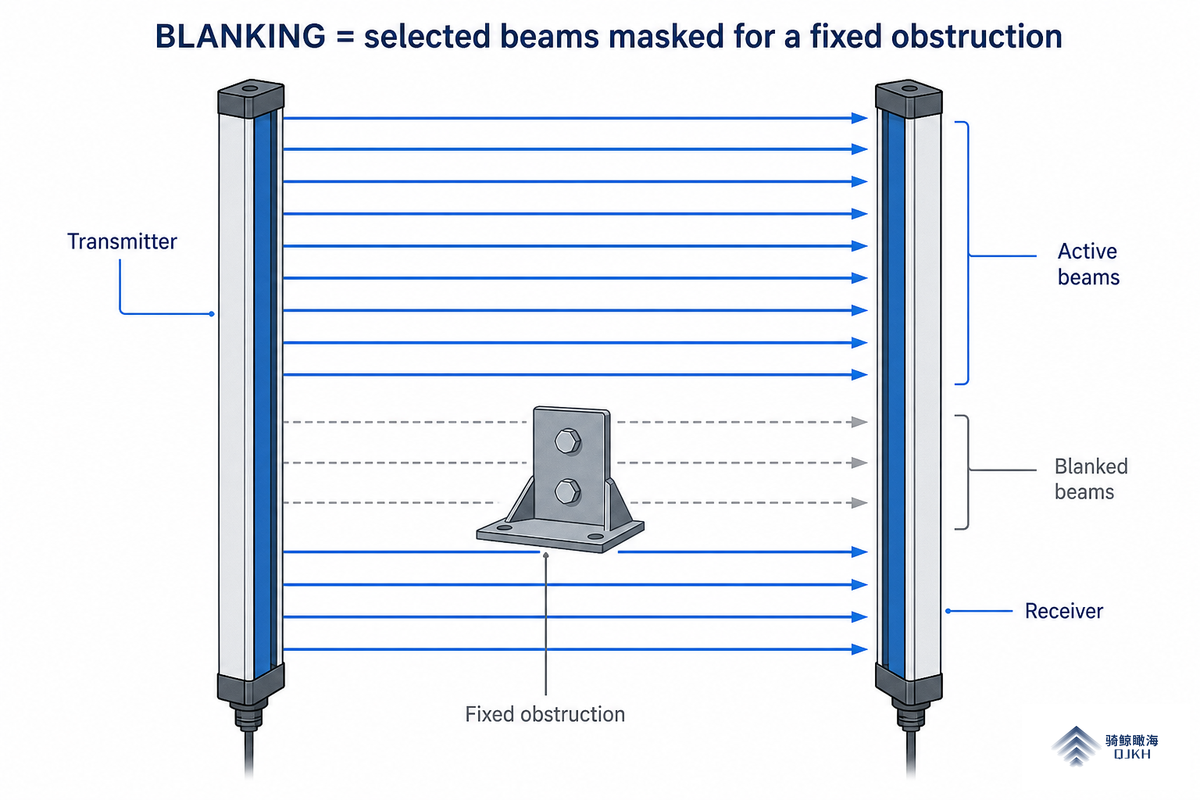
A safety light curtain projects a grid of infrared beams from a transmitter to a receiver, and when an object interrupts enough beams the safety outputs (OSSDs) de-energize and stop the machine. Blanking is the configured exception to that rule: it lets a defined set of beams stay broken without triggering a stop.
Whenever the field is interrupted elsewhere, that machine stoppage still keeps an operator out of the hazardous area. Engineers also call it the blanking function, and on most light curtain systems it’s disabled by default until an integrator deliberately enable and teaches it.
In practice, the purpose is simple. Many machines have something that must sit inside the protective field, a conveyor rail feeding a hydraulic press, a clamping hose, a robotic fixture, or a sheet of stock. Without blanking, that permanent obstruction would hold the curtain in a tripped state and the machine would never run. With blanking, the curtain tolerates the known object while still protecting the point of operation around it.
IEC 61496-2 classifies these curtains as active opto-electronic protective devices (AOPDs), and blanking is a defined option within that standard rather than a vendor add-on. QJKH engineers size each blanked zone deliberately, because reducing the grid changes the ISO 13855 safety distance and the reach-through risk, not just the wiring. There is one detail every integrator should internalize: when you blank a portion of the light grid, the blanked area extends the full depth from transmitter to receiver. It is a tunnel through the protected area, not a small patch on one face, which is exactly why blanking is treated as a safety-related decision, not a convenience setting.
💡 Pro Tip
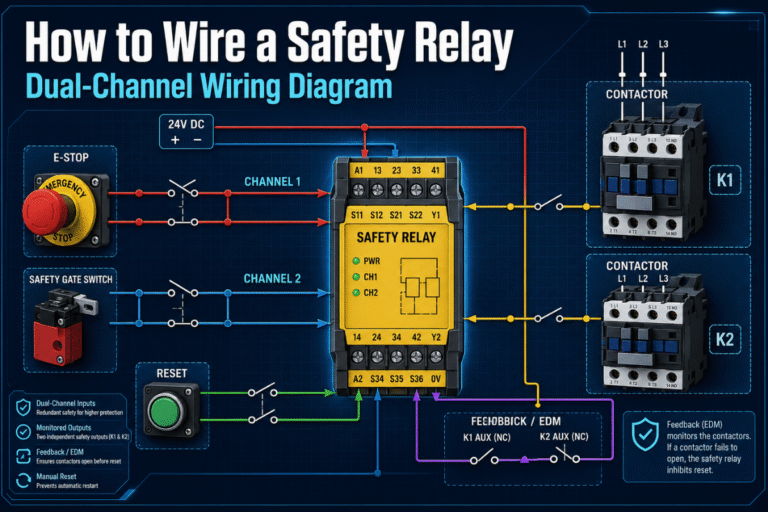
Blanking is a function of the curtain itself, not the safety relay or controller downstream. If you are still mapping out the control chain, our guide to the safety light curtain system shows where the curtain, output signals, and reset logic fit together.
The Three Types of Blanking: Fixed, Floating, and Reduced Resolution
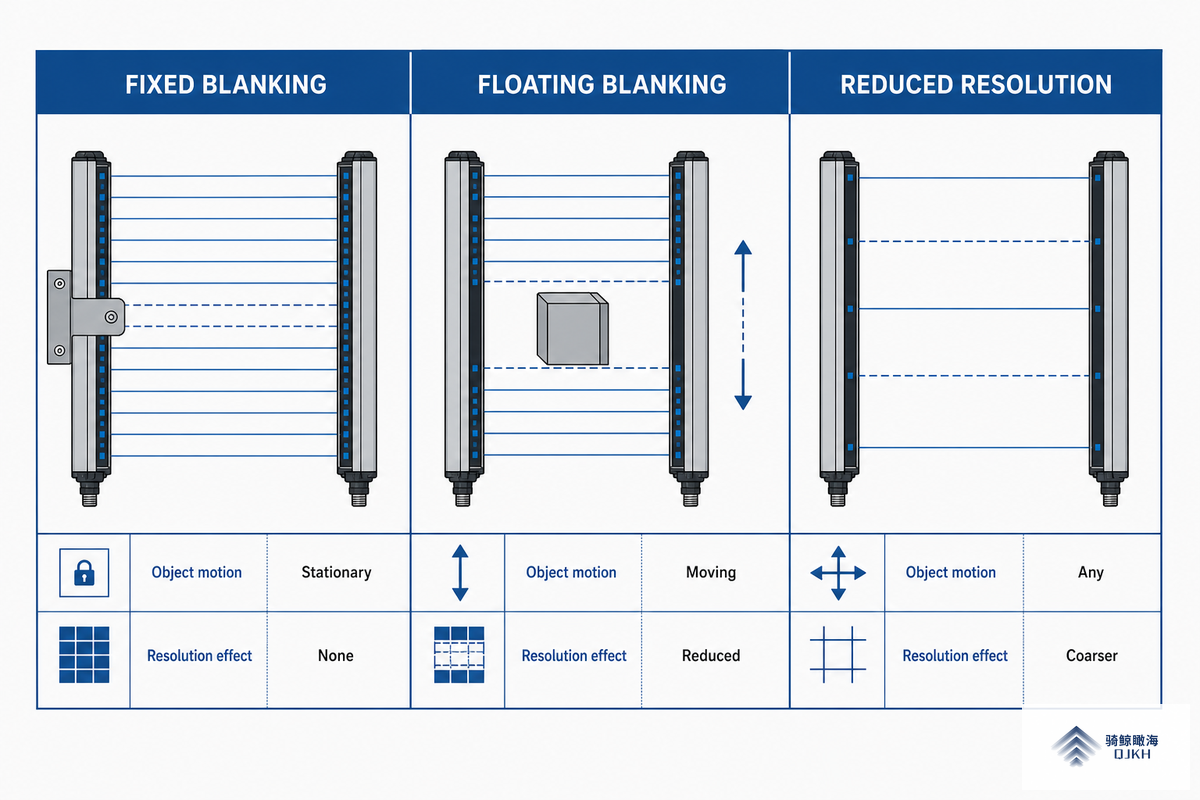
Most vendor glossaries list “two types of blanking.” In the field there are three, and the difference decides whether your object can move. Fixed blanking holds a static set of beams open at one location. Floating blanking lets a defined number of adjacent beams be broken anywhere within a range, so the object can travel. Reduced-resolution (programmable) blanking teaches the curtain the object and tolerates it while coarsening the detection grid. Choosing the wrong one is a common cause of nuisance stops and of over-blanking.
| Blanking type | What it ignores | Object motion | Resolution effect |
|---|---|---|---|
| Fixed blanking | A fixed set of beams (a blanking window) | Stationary object only | Local blind zone; rest of field unchanged |
| Floating blanking | N adjacent beams, anywhere in a range | Object may move (coil stock, clamp hose) | Coarsens detection by the floated beam count |
| Reduced resolution | A taught object profile | Repeating object presence | Enlarges minimum detectable object globally |
Type definitions per IEC/TS 62046 and field practice.
What is the difference between fixed and floating blanking?
Fixed blanking ignores a set of beams at one location, so it suits an object that never move, such as a guard rail or a permanent bracket through the field. Floating blanking ignores a set number of adjacent beams but lets their position shift within a range, so it suits an object that travels, like coil stock that rises and fall.
A useful rule: if the object is bolted down, fix it; if it wanders, float it. One advanced variant, floating blanking with compulsory object presence, inverts the logic: the blanked beams must stay occupied, so removing the object faults the curtain and prevent a restart.
📐 Engineering Note
Floating blanking is defined by a beam count, not a millimetre gap. On a 14 mm-resolution curtain, every beam you float widens the smallest object the grid can still catch. QJKH ENT Type 4 curtains, for example, offer 14, 30, and 40 mm resolutions across a 160–1827 mm protective height with a response time of ≤14 ms, so the floated count directly trades detection against flexibility. Keep it to the minimum the application need, one or two beams, and verify it against the object’s real travel, not its nominal size.
Blanking vs Muting: The Difference Engineers Mix Up Most
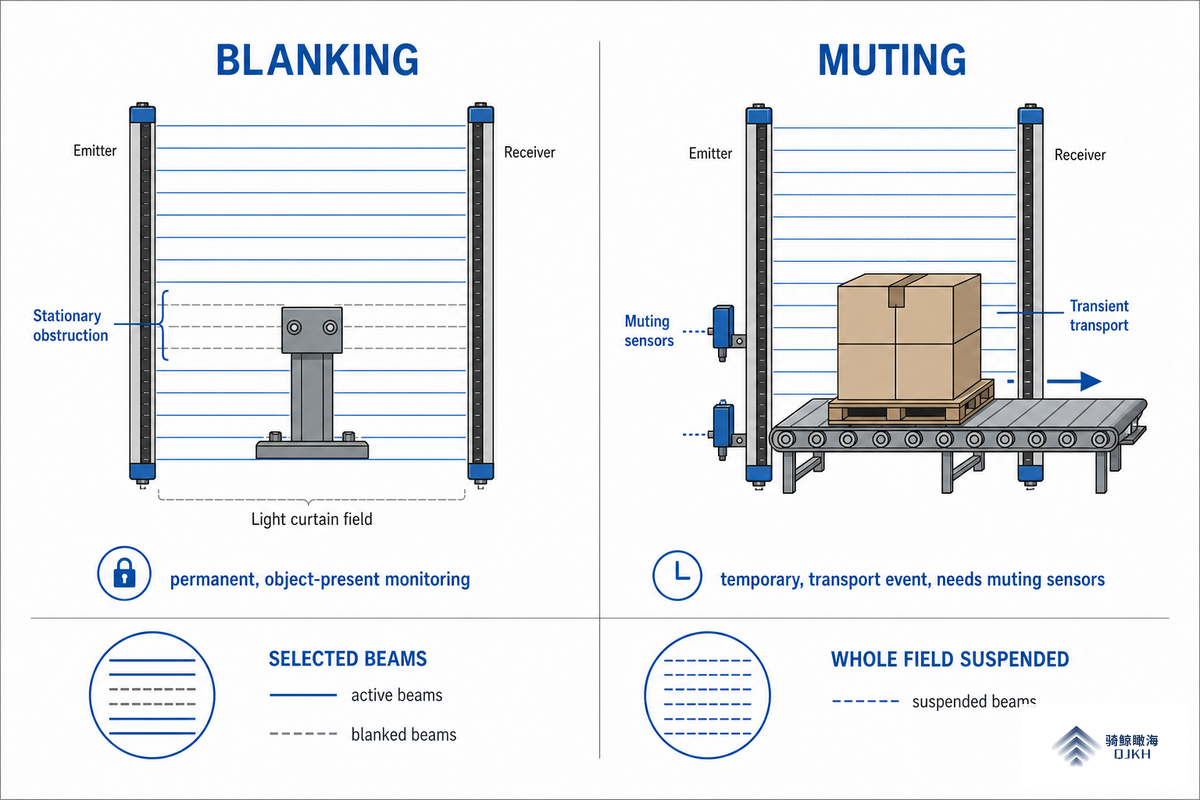
Blanking and muting both let objects pass a safety light curtain without stopping the machine, but they aren’t interchangeable. Blanking suspends part of the field continuously for a stationary or repeating object; muting suspends the entire field briefly for a transient transport event, and it relies on additional sensors to decide when it’s safe. Engineers on PLC forums report the two are routinely confused, and that support varies by manufacturer, so getting the distinction right at the design stage matter.
| Dimension | Blanking | Muting |
|---|---|---|
| Scope | Part of the protective field | The entire protective field |
| Duration | Continuous (always active) | Temporary (a timed window) |
| Trigger | Taught zone of beams | ≥2 independent muting sensors |
| Typical use | Fixture or stock permanently in the field | Pallet or AGV passing through |
| Press rule (OSHA) | Not cycle-gated | Permitted on the upstroke only |
Press-mode muting rule per OSHA 29 CFR 1910.217(c)(3)(iii)(d).
Standards back this up. On mechanical power presses, OSHA permits muting, “bypassing of the PSD during the upstroke of the press slide”, only “for parts ejection, circuit checking, and feeding,” per OSHA’s Machine Guarding eTool. Blanking, by contrast, runs throughout the cycle. If you need to suspend protection only during one phase of the machine cycle, you want muting; if you need to tolerate a fixed obstruction at all times, you want blanking. For a deeper treatment of the timed-bypass case, see our guide to muting a safety light curtain.
“The mistake we see most is a plant using blanking where the application actually needs muting, or vice versa. Blanking is for the object that lives in the field; muting is for the object that passes through it. Get that backwards and you either fight nuisance stops or you leave a gap open longer than you should.”
How Blanking Changes Detection Capability and Safe Distance
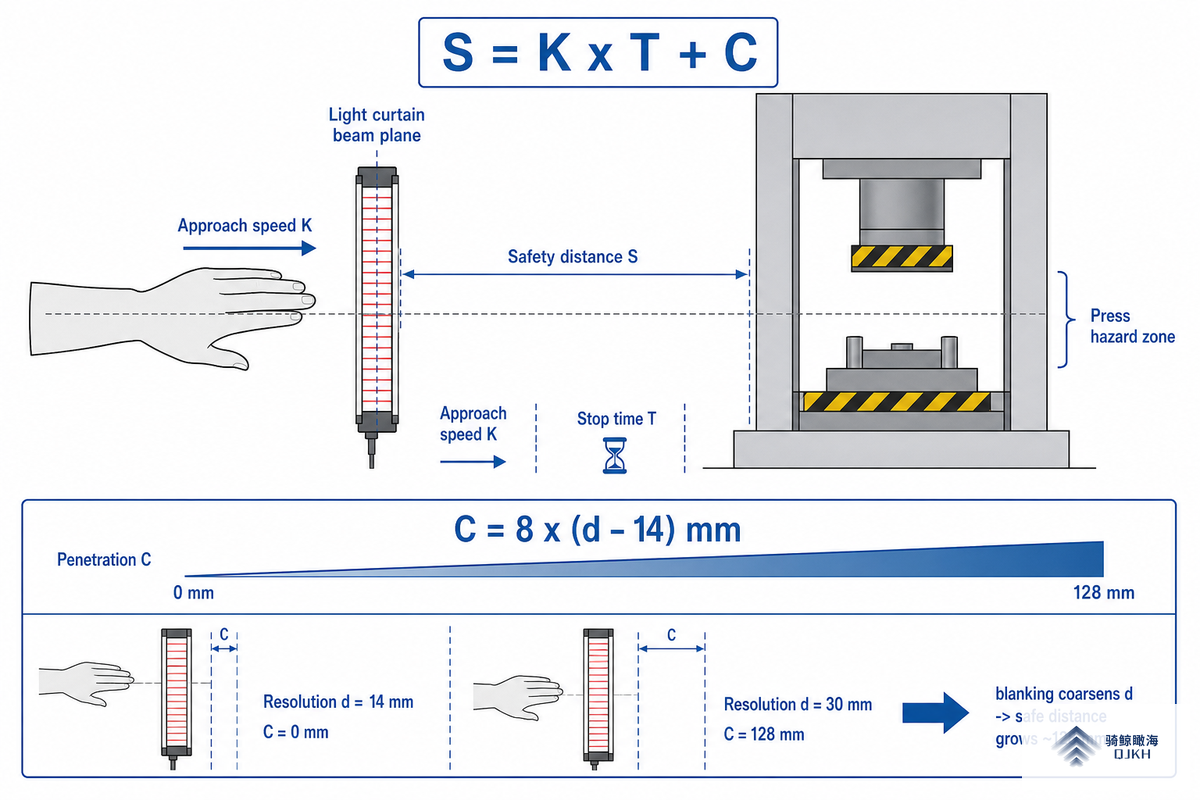
Blanking is not free. Every beam you blank or float enlarges the smallest object the curtain can still detect, its detection capability, or resolution, d. Because the minimum safety distance under ISO 13855 depends directly on d, blanking can push the curtain farther from the hazard. ReeR and other ESPE makers flag this explicitly: using the blanking function “may need a recalculation of the safety distance due to the modified detection capability.” This is the catch that thin guides skip.
ISO 13855 sets the minimum distance as S = K × T + C, where K is the approach speed (2000 mm/s for a hand reach, or 1600 mm/s in some cases), T is the total stop time of the machine plus the curtain’s response time (typically 14–50 ms), and C is an intrusion term tied to resolution. For a vertical curtain detecting fingers or hands (d ≤ 40 mm), C = 8 × (d − 14) mm.
📐 Engineering Note: The Resolution Penalty Rule (worked example)
Take a 14 mm finger-detection curtain on a machine with a 0.20 s total stop time, K = 2000 mm/s.
• Baseline: C = 8 × (14 − 14) = 0 mm → S = 2000 × 0.20 + 0 = 400 mm.
• Now apply floating blanking that degrades effective detection capability to 30 mm: C = 8 × (30 − 14) = 128 mm → S = 400 + 128 = 528 mm.
Blanking just added 128 mm to the distance the curtain must sit from the hazard. Run the same arithmetic with your own stop time before you blank a single beam.
Exact numbers depend on your measured stop time T, the approach direction, and machine geometry, so treat the example as a method, not a fixed answer, request a real stop-time test on your press before finalizing the mount. The takeaway holds regardless: blank more, and you must either accept a longer safe distance or add complementary guarding. For the underlying detection grid, our explainer on finger and hand protection resolution shows how 14 mm, 30 mm, and 40 mm grids compare.
How to Configure Blanking on a Safety Light Curtain
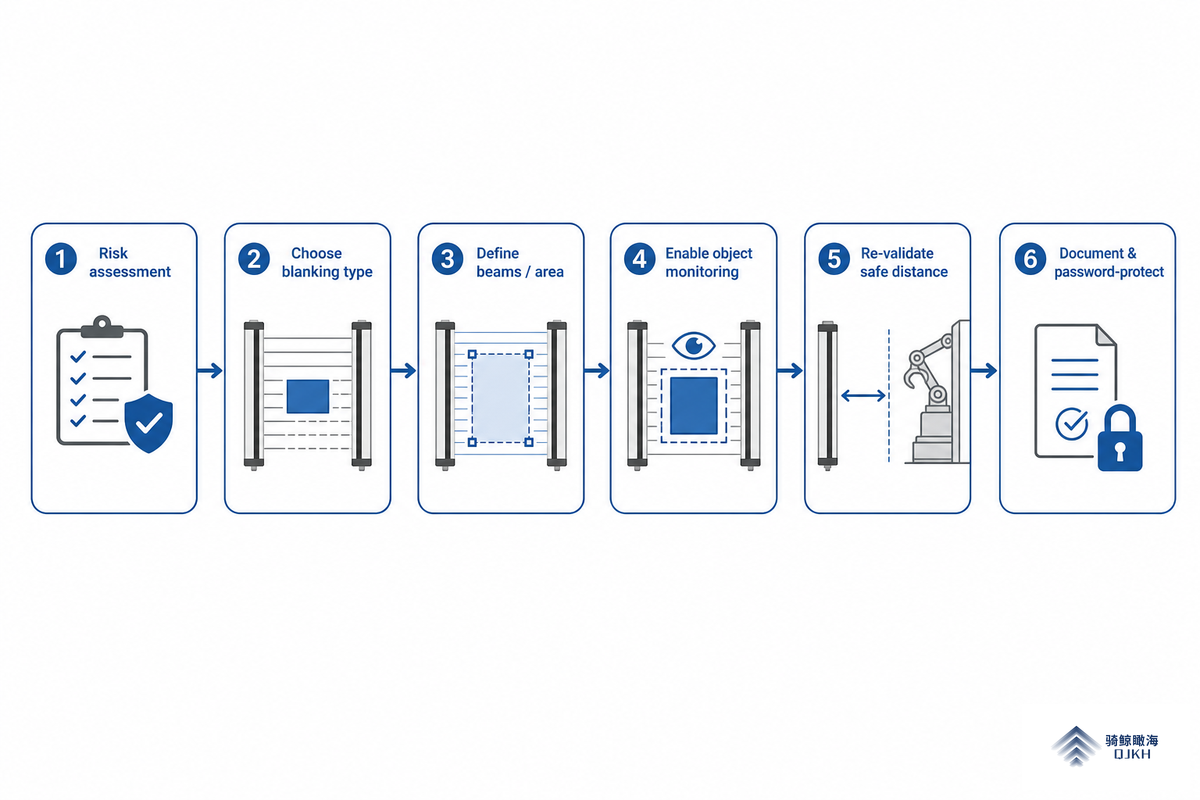
Blanking is configured at the curtain itself, through DIP switches, a key-switch teach box, or a software tool, and on most light curtain systems it ships disabled. An integrator enable it, teaches the blanked zone by blocking the relevant beams in teach mode, verifies the visual indicator, then locks the setup under supervisory control before returning the unit to run mode. It’s a deliberate, recorded change, not a casual one.
Behind that sequence sit several choices. A selector switch sets the mode of operation, and the software tool lets you programme the blanked beams, run diagnostics, and confirm the curtain’s specification before you commission it, the selection, configuration, and commissioning steps that IEC/TS 62046 sets out for presence-sensing protective equipment. Teaching actuates the chosen beams; removing the object can deactivate them or fault the curtain, based on how blanking is set up. Decide too whether the curtain uses automatic reset or a manual reset that holds the fault until a reset button is pressed, and make sure a key switch or password stops unauthorized staff overriding the blanked area. In practice, on a typical press-brake production cell, the integrator teaches the two beams the locating rod occupies, writes the DIP positions onto the setup sheet, then locks the key switch before the shift starts, so the next operator inherits a documented, repeatable configuration rather than a guess.
- ✔ Run a risk assessment first, confirm blanking is permitted for this hazard.
- ✔ Choose the type (fixed, floating, or reduced resolution) from the object’s motion.
- ✔ Teach the minimum number of beams; don’t over-blank “for margin.”
- ✔ Recalculate the safety distance for the new detection capability.
- ✔ Lock the configuration behind a key switch or password, and document it.
Can blanking be changed without re-validating the machine?
No. Any change to the blanked zone change detection capability, which changes the required safety distance and therefore the safeguard’s validity. Treat every blanking change as a re-validation event: recompute the distance, confirm complementary guarding still covers reach-over and reach-under, and re-test the stop function.
Wintriss puts it plainly in its press guidance: adjust blanking as jobs change and “make it part of your setup procedures.” A blanked zone left over from a previous job is one of the quietest ways to compromise a working safeguard.
⚠️ Important
Unmonitored blanking can be defeated. If the curtain does not verify that the blanked object is actually present, an operator can reach through the open zone. Where the standard allows, prefer floating blanking with compulsory object presence, which faults the curtain when the object is missing.
Where Blanking Is Used: Press Feeding, Conveyors, and Fixturing

Blanking earns its keep wherever a known object has to share the protective field with the operator. A common case is an empty pallet entering a cell on a conveyor that feed a hydraulic press: a few lower beams are blanked so the pallet passes, yet the curtain still trips if someone stands on it.
Other common cases are coil stock that rises and fall, clamping hoses that travel with the slide, and robotic fixtures that protrude into the field on every cycle.
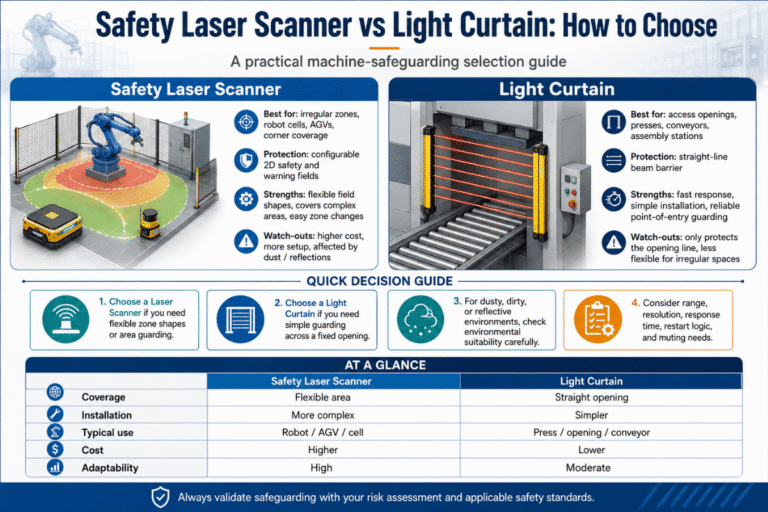
A real scenario show why type selection matters. A fabricator running a press brake had a locating rod that protruded through the lower edge of the light curtain on every bend. Fixed blanking failed because the rod shifted a few millimetres between jobs and tripped the curtain; switching to floating blanking of two adjacent beams let the rod travel within its range while keeping the rest of the field live. That fix took minutes once the team stopped treating a moving object as a static one, and it removed roughly a dozen nuisance stop, and the downtime they caused, per shift without weakening protection at the point of operation. On the press itself, the operator still initiates each cycle with palm buttons; blanking never replaces that two-hand control. Where a layout need a whole floor zone protected rather than a flat plane, a safety laser scanner replaces the curtain instead of blanking around the obstacle.
| Application object | Object motion | Blanking type | Key caution |
|---|---|---|---|
| Permanent guard rail or bracket | Stationary | Fixed blanking | Size the curtain to the object width |
| Coil stock rising and falling | Vertical travel | Floating blanking | Limit to 1–2 beams |
| Hydraulic clamp hose | Moves with the slide | Floating blanking | Re-check after a stroke change |
| Empty pallet on a conveyor | Through-feed | Fixed or reduced resolution | Must still trip if a person stands on it |
| Press locating rod | Shifts a few mm between jobs | Floating blanking | Re-teach at every job change |
| Robotic tool entering the field | Cyclic | Reduced resolution | Use object-presence monitoring |
| Sheet stock placed in a press | Loaded by operator | Floating with compulsory presence | Faults if the sheet is absent |
| Varying pallet sizes | Different widths | Floating blanking | Set to the largest expected width |
| Scrap chute or fixed duct | Stationary | Fixed blanking | Recalculate the safe distance |
Application-to-type guidance compiled from IEC/TS 62046 practice and field configuration.
These patterns repeat across packaging, automation, and robotic cells. If you’re matching a curtain to one of them, our guide to press machine safeguarding maps the curtain, blanking, and stop logic to that layout.
5 Field Mistakes That Void Type 4 Blanking
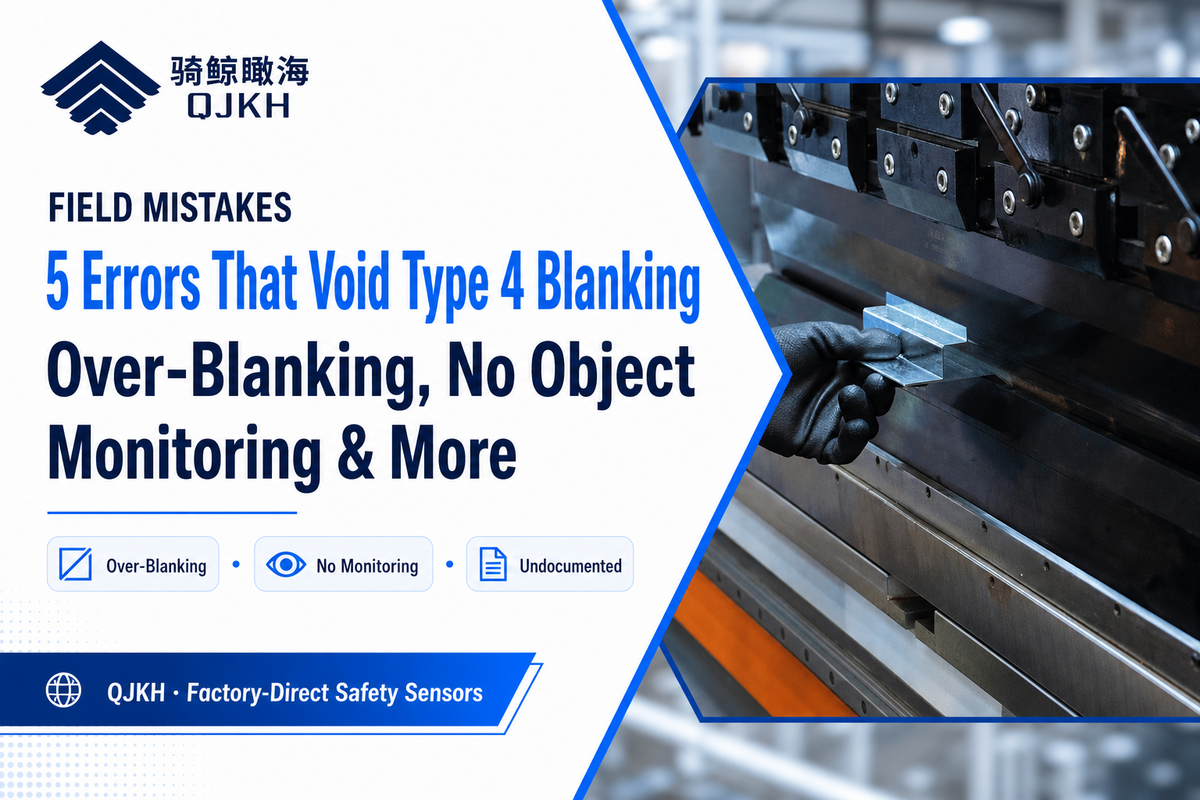
A Type 4 curtain delivers the highest assurance an ESPE can provide, but blanking is a place where good hardware gets undermined by configuration. These five mistakes show up repeatedly in audits and forum threads.
The five most common blanking failures
- Confusing blanking with muting, using a continuous bypass where the application need a timed, sensor-gated one (or vice versa).
- Over-blanking “for margin”floating more beams than the object need, enlarging the blind zone and the safety distance.
- No object-presence monitoringleaving an open tunnel an operator can reach through when the object is absent.
- Not recalculating the safety distancekeeping the old mount after blanking degrades detection capability.
- Undocumented, unlocked changes, a blanked zone left from a previous job, with no key switch and no record.
Each of these is a reason OSHA requires that “guards must be used to protect all areas of entry to the point of operation not protected by the presence sensing device”, blanking creates exactly such an unprotected area, and the surrounding guarding has to account for it. Complementary measures close the gap: fixed guards, a horizontally mounted curtain to cover a pass-through, or mirrors used to wrap the field around a corner, though each mirror costs roughly 10% of available scanning range, so alignment matters. If you’re wiring the safeguard, our safety light curtain wiring diagram shows where the output and reset signals belong, and the broader machine guarding with light curtains guide covers complementary fixed guards.
Standards and Compliance for Blanking

Blanking sits at the intersection of several standards. The curtain itself is built to IEC 61496; the way you select, position, and configure it, including blanking and the “additional means” needed to stop someone reaching through a blanked area, is the subject of IEC/TS 62046. Distance comes from ISO 13855, performance level from ISO 13849-1, and in the United States the legal backstop for presses is OSHA 1910.217 with ANSI B11.19 as the consensus safeguarding standard. Beyond the formal standards, published guidelines for safety light curtains from associations and vendors translate these clauses into setup practice. Remember too that a light curtain is one safety device within a larger safety system: the blanking output passes through the machine control as a control device signal, the active protection field must still be validated, and local laws can impose stricter duties than the standards themselves.
| Standard | Scope | Blanking-relevant point |
|---|---|---|
| IEC 61496-1/-2 | ESPE / AOPD construction | Defines Type 2 and Type 4 curtains and the blanking function |
| IEC/TS 62046 | Selection, positioning, configuration | Additional means to stop reaching through blanked areas |
| ISO 13855 | Positioning of safeguards | S = K × T + C; resolution drives the distance |
| ISO 13849-1 | Safety-related control performance | Performance level (PL) of the safety function |
| OSHA 1910.217 / ANSI B11.19 | US press / safeguarding law | PSD requirements, upstroke-only muting, safe distance |
Two anchors are worth citing directly. OSHA 29 CFR 1910.217 governs presence sensing on mechanical power presses, and general guarding duties fall under OSHA 29 CFR 1910.212. International positioning math is defined in ISO 13855. The choice between a Type 2 and Type 4 device also affects how much you can safely blank, our Type 2 vs Type 4 risk-based selection guide walks through that decision.
Industry Outlook: Blanking Moves from DIP Switches to Monitored Software
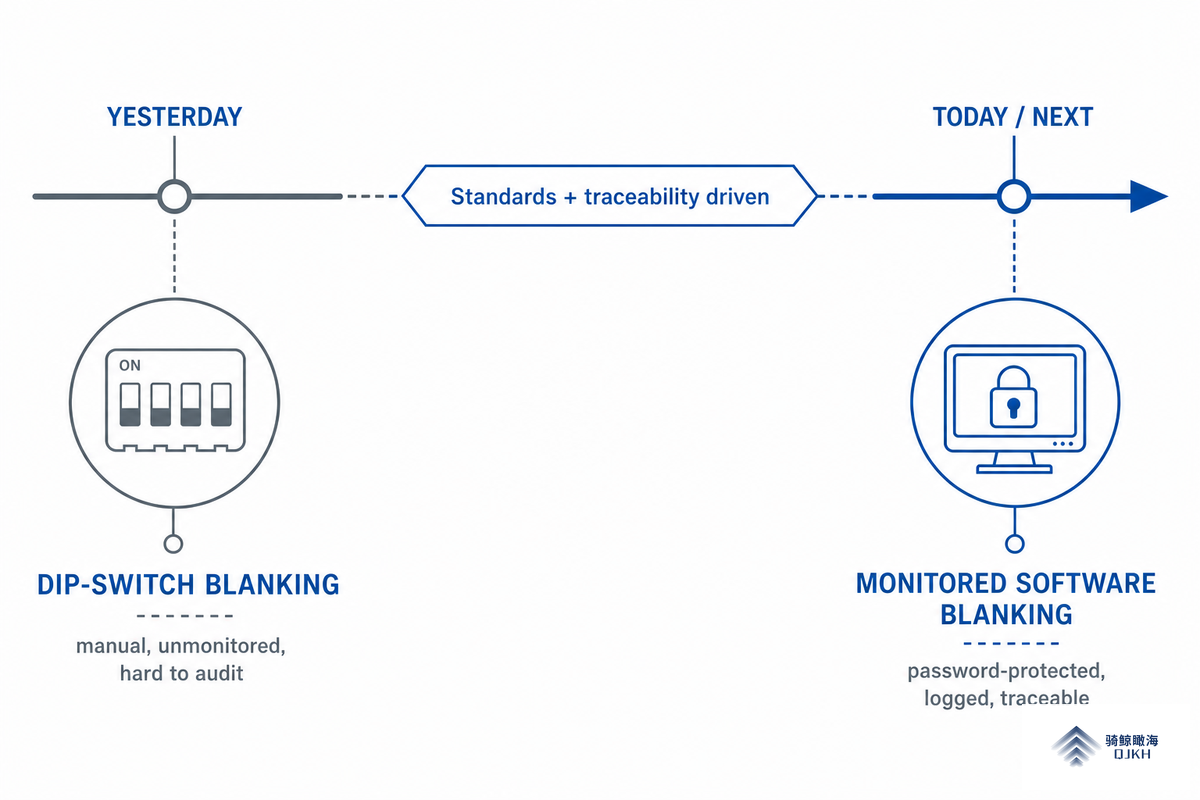
What is changing in blanking is not market size, it is traceability. Regulators and standards bodies are tightening how a blanked safeguard must prove it has not been quietly defeated, and the revision of IEC/TS 62046 toward EN IEC 62046:2026 re-codifies the “additional means” required around blanked areas. For a buyer, that means the audit risk of a silently over-blanked curtain is rising, and the answer is configuration you can prove.
Technically, that’s pushing blanking off bare DIP switches and onto monitored, software-tool configuration, password-protected, logged, re-loadable, and backed by on-board diagnostics that speed troubleshooting when a blanked job won’t validate. A blanking setup you can export, version, and present to an auditor is worth more than a switch position no one recorded. Market-research houses project the broader safety-sensor segment growing through the late 2020s, but treat that figure as background only; the decision driver for a 2026 purchase is whether the curtain’s blanking can be locked down and documented.
For example, a 2026 compliance audit increasingly asks to see the exported blanking configuration file, not just a switch position, and a plant that can’t produce one risks a finding even though the hardware is sound. If you’re specifying now, prioritize curtains whose blanking is software-configurable with object-presence monitoring, and write the re-validation step into your job-change procedure so the proof exists before an auditor asks.
Frequently Asked Questions
Q: What is blanking on a light curtain?
View Answer
Blanking is a configured function that lets a safety light curtain ignore a defined part of its protective field, so a fixture, conveyor, or workpiece can occupy those beams without stopping the machine. The rest of the field keeps protecting the operator. It is optional, disabled by default on most curtains, and must be deliberately taught and locked under supervisory control.
Q: What is the difference between muting and blanking?
View Answer
Blanking suspends part of the field continuously for a stationary or repeating object. Muting suspends the whole field briefly for a transient event such as a pallet passing through. OSHA permits muting only on the press upstroke, whereas blanking runs the whole cycle.
Q: Does blanking make a light curtain less safe?
View Answer
Blanking reduces detection capability in the blanked zone, which can require a longer safety distance under ISO 13855 (C = 8 × (d − 14) mm). Used correctly, with the minimum number of beams, object-presence monitoring, a recalculated distance, and complementary guarding, it does not lower protection at all. Used carelessly, it opens a reach-through tunnel that runs the full depth from the transmitter to the receiver, and an operator can reach through the gap.
Q: How many beams can floating blanking ignore?
View Answer
Floating blanking is set by a beam count, commonly one or two adjacent beams, with the maximum defined by the curtain and your risk assessment. Use the fewest beams the travel needs, since each extra blanked beam enlarges the smallest detectable object.
Q: Do you have to re-validate after enabling blanking?
View Answer
Yes, always. Recompute the safety distance, confirm that complementary guarding still covers reach-over and reach-under, and re-test the stop function whenever the blanked zone changes. Any change to the blanked beams changes the detection capability, so the old mounting position may no longer be safe, and a leftover zone from a previous job is a common audit finding even when the hardware itself is perfectly sound. Treat re-validation as part of every job-change procedure.
Q: What standards cover blanking on safety light curtains?
View Answer
No single document covers blanking. Construction follows IEC 61496-1/-2; selection, positioning, and the additional means around a blanked area follow IEC/TS 62046; distance follows ISO 13855; performance level follows ISO 13849-1; and OSHA 1910.217 with ANSI B11.19 cover presses.
Specifying a light curtain with blanking?
QJKH builds Type 4 SIL3/PLe safety light curtains with fixed and floating blanking, muting, and external device monitoring, in 14, 30, and 40 mm resolutions. Tell us about your machine, the object that has to sit in the field, and your measured stop time, and our engineers will match the curtain, the blanking mode, and the safe distance for you.
Why We Wrote This
QJKH manufactures the Type 2 and Type 4 light curtains described here, including the blanking and muting functions, so the configuration trade-offs and the ISO 13855 resolution-penalty math in this guide come from building and supporting these devices in the field. Reviewed by the QJKH technical team.
References & Sources
- Machine Guarding eTool, Presence Sensing DevicesU.S. Occupational Safety and Health Administration
- 29 CFR 1910.217, Mechanical Power PressesU.S. Occupational Safety and Health Administration
- 29 CFR 1910.212, General Requirements for All MachinesU.S. Occupational Safety and Health Administration
- ISO 13855, Positioning of Safeguards with Respect to Approach SpeedsInternational Organization for Standardization
- IEC 61496-1, Electro-Sensitive Protective EquipmentInternational Electrotechnical Commission
- IEC/TS 62046, Application of Protective Equipment to Detect the Presence of PersonsInternational Electrotechnical Commission