Póngase en contacto con la empresa QJKH
El escáner láser de seguridad frente a la cortina de luz es la opción de protección de la máquina entre la detección de área y la detección del punto de operación, y todo se reduce a una pregunta práctica que enfrenta un operador en la prensa, la celda del robot o el piso: ¿necesita una atención rápida y alta? ¿Protección de dedos de alta resolución justo en el punto de operación, o monitoreo de área de varios metros a lo largo, digamos, tres marcos de máquinas o 50 metros de vía AGV? Ambos son dispositivos ópticos de seguridad de detección de presencia que detienen la maquinaria antes de que una persona alcance un peligro, pero el espacio de seguridad que protegen adopta dos formas muy diferentes. Esta guía compara a cortina ligera y un escáner láser sobre el método de detección, el tipo y la clasificación SIL, la resolución, la distancia de seguridad y el costo a cinco años, para que pueda elegir el correcto para su prensa o concluir que ambos pertenecen a la mejor solución de seguridad.
Especificaciones rápidas: escáner láser de seguridad versus cortina de luz
| Método de detección | Cortina: conjunto de haces infrarrojos (plano) · Escáner: láser de tiempo de vuelo (campo 2D) |
| Techo de seguridad | Cortina: Tipo 4 / SIL 3 / PLe · Escáner: Tipo 3 / SIL 2 / PLd |
| Resolución | Cortina: 14 / 30 / 40 mm (dedo/mano/cuerpo) · Escáner: pierna mínima de 70 mm |
| Tiempo de respuesta | Cortina: ≤ 5-5-15 ms · Escáner: 60-134 ms (dependiente del ciclo de escaneo) |
| Peligro de mejor ajuste | Cortina: punto de operación · Escáner: zona, piso y zonas móviles (AGV) |
Escáner láser de seguridad frente a cortina de luz: la respuesta rápida
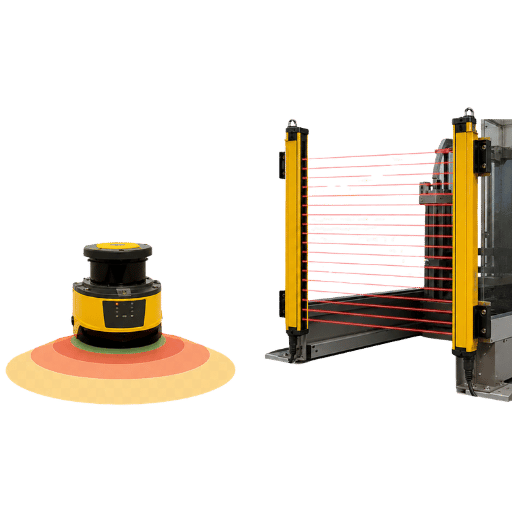
A cortina de luz de seguridad protege un plano de detección fijo en el punto de operación y alcanza el Tipo 4/ SIL 3 para protección de dedo a cuerpo; un escáner láser de seguridad protege un área bidimensional configurable o una zona de piso en el Tipo 3/ SIL 2, que se adapta a AGV, células robóticas y monitoreo perimetral grande. En resumen: la cortina de luz gana cuando un trabajador mete la mano en una máquina, y el escáner láser gana cuando un trabajador camina alrededor de ella. La mayoría de las plantas terminan usando ambos y uno solo módulo de relé de seguridad puede procesar la señal de alto desde cualquiera de los dispositivos.
Los números; los estándares; un ISO 13855 cálculo de distancia segura que puede realizar usted mismo; y un selector de cuatro preguntas para realizar la llamada.
Entender esto mal es un error costoso: un dispositivo subestimado puede fallar en una auditoría de seguridad, mientras que un escáner sobreespecificado desperdicia presupuesto en un dedo de 14 mm y corre el riesgo de que una cortina ya cubra. Debido a que QJKH diseña tanto la cortina ENT como el escáner SH para IEC 61496, nuestro equipo de producción certificado mide la decisión a la prensa o a la celda del robot frente a usted, no el folleto.
Cómo detecta cada dispositivo: plano de detección versus campo de escaneo
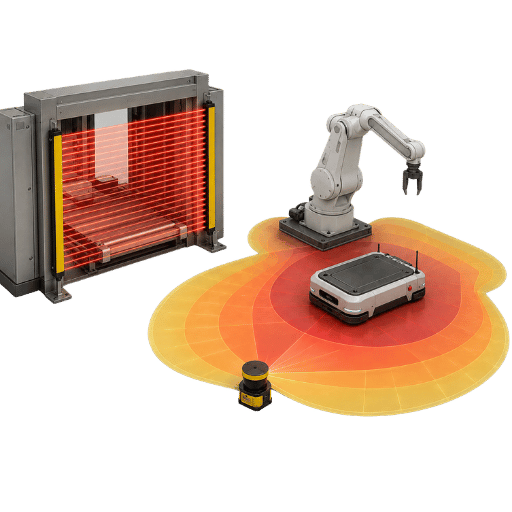
La diferencia fundamental es la geometría y vale la pena nombrarla. Lo llamamos modelo de cobertura de plano versus campo: una cortina de luz protege un avión, mientras que un escáner láser protege un campo. Una cortina coloca un transmisor y un receptor a cada lado de una abertura, mientras que un escáner se coloca en una esquina y barre el piso, y esa única diferencia estructural impulsa casi todo lo demás en esta comparación.
Una cortina de luz de seguridad se forma a partir de un transmisor y un receptor que están uno frente al otro y emiten una serie vertical u horizontal de haces de luz infrarroja. Si algún objeto opaco bloquea un haz, entonces el receptor deja caer la señal y el dispositivo emite una señal de parada inmediata. Dado que el espaciado de los haces es fijo, la cortina no tiene concepto de forma o posición de lo que se mueve a través de ella; sólo sabe que hay una intrusión, a la que luego responde muy rápidamente de forma binaria.
Un escáner láser de seguridad opera en el tiempo de vuelo. Un rayo láser pulsante es proyectado por un espejo de escaneo, barre hasta 270° y multiplica el reflejo para medir la distancia. El escáner no tiene un receptor independiente; a diferencia de una cortina, no necesita una unidad opuesta, ‘lee’ el reflejo del espacio ambiental. El software define áreas de protección y advertencia seleccionables, por lo que el mismo escáner puede cubrir una región incómoda, activar una advertencia en otra región y luego ordenar la detención cuando un objeto invade el área interior. US9423499B2 describe un método seguro de detección de objetos y evaluación de resultados, y US11624823B2 cubra cómo un escáner monitorea su propio funcionamiento para garantizar un uso seguro cuando ocurre contaminación.
¿Cuál es la diferencia entre un sensor de área y una cortina de luz?
Un sensor de área (de lo contrario, un escáner de seguridad, un escáner láser de seguridad o un escáner de área) mide un área bidimensional y responde a la presencia dentro de un entorno de área. Una cortina de luz sólo detecta si un objeto rompe un plano de rayos. En otras palabras, un escáner de área mide el espacio alrededor de una máquina; una cortina dibuja una línea de disparo. Por eso los escáneres protegen los pisos de los robots, mientras que las cortinas protegen las aberturas de prensa.
📐 Nota de ingeniería
La resolución de una cortina depende del espaciado de sus haces. El espaciado de 14 mm funciona para detectar el dedo, el de 30 mm funciona para detectar una mano, el de 40 mm detecta el cuerpo según las convenciones predominantes de detección de dedos y manos que siguen SICK, entre otras. La detección mínima resoluble del escáner está determinada por su objeto objetivo y normalmente se establece en 70 mm, para cubrir el suelo con el escáner horizontalmente. No hay forma de lograr una resolución de 14 mm con un escáner y utilizar una cortina en espacios abiertos no tiene sentido. La decisión debe depender de la parte del cuerpo que se detecta y de la configuración geométrica, no de las afirmaciones de la marca.
La razón por la que esto importa es estructural: debido a que el plano de la cortina es fijo, no puede seguir a un robot en movimiento o AGV, y esa compensación es la causa raíz de toda la comparación. Un escáner lee la luz reflejada a lo largo de varios metros, por lo que tolera un cambio de diseño que una cortina de 1.827 mm no puede, según IEC 61496-3.
Clasificación de seguridad: Cortina Tipo 4 / SIL 3 vs Escáner Tipo 3 / SIL 2
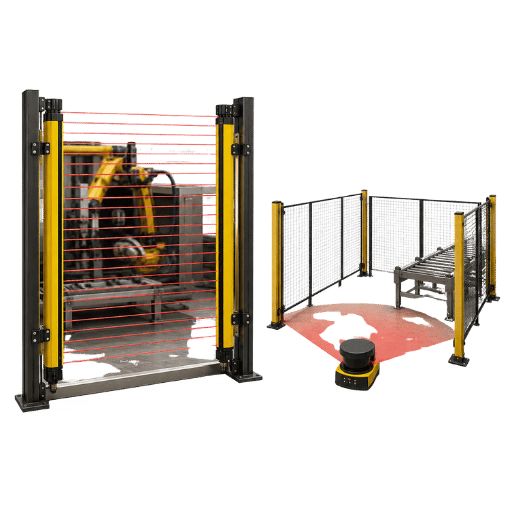
Aquí está el punto que es la fuente de casi todos los errores en la toma de decisiones, y se puede decir claramente “-como la ”Regla de techo tipo“, ”ningún escáner de tipo 3/SIL2/PLd/categoría 3, por sofisticado que sea, puede servir como sustituto de las cortinas de luz tipo 4 / SIL3 / PLe / categoría 4 en los puntos de mayor riesgo. El eslogan que “los escáneres láser de seguridad están desplazando las cortinas de luz” se mantiene en las áreas y periferias de protección, pero sólo en esos lugares. No se aplica cuando se debe utilizar la seguridad superior del Tipo 4 en el dedo del punto de operación y otras áreas.
Las clases de tipo emanan del IEC 61496 Familia de estándares de equipos de protección electrosensibles (ESPE). Las cortinas de luz son dispositivos de protección optoelectrónicos activos (AOPD) de tipo 2 o 4. Los escáneres láser son dispositivos de protección optoelectrónicos activos que responden a la reflexión difusa (AOPDDR), clasificados como Tipo 3. En la edición de 2025, la capacidad de detección y los mínimos de detección de fallas para dispositivos Tipo 3 se elevaron en IEC 61496-3. Su alcance máximo para el nivel de rendimiento (PL) y el nivel de integridad de seguridad (SIL) están dados por ISO 13849-1 e IEC 62061, respectivamente. Como afirma fácilmente Datasensing (que construye ambos), un escáner alcanza PLd, pero solo una cortina de tipo 2 PLc (aunque el tipo 4 logra PLe).
| Atributo | Cortina de luz de seguridad | Escáner láser de seguridad |
|---|---|---|
| Clase ESPE (IEC 61496) | AOPD « Tipo 2 o Tipo 4 | AOPDDR « Tip 3 |
| Sil máximo (IEC 62061) | SIL 3 | SIL 2 |
| Max PL (ISO 13849-1) | PLe (Cat 4) | PLd (Cat 3) |
| ¿Adecuado para el punto de operación? | Sí « detección de dedos y manos | No « solo área y piso |
Clasificación según IEC 61496-1/-2/-3, ISO 13849-1 e IEC 62061.
“Trate la clasificación de tipo como un techo, no como una preferencia. Primero dimensionamos cada cotización para la evaluación de riesgos: si el peligro es una presión eléctrica donde las manos entran en el espacio del dado, la respuesta es una cortina Tipo 4, punto. El escáner gana su lugar alrededor de la celda, no en el punto de contacto”
Equipo de Ingeniería de Seguridad Funcional QJKH
Capacidad de detección y resolución comparadas
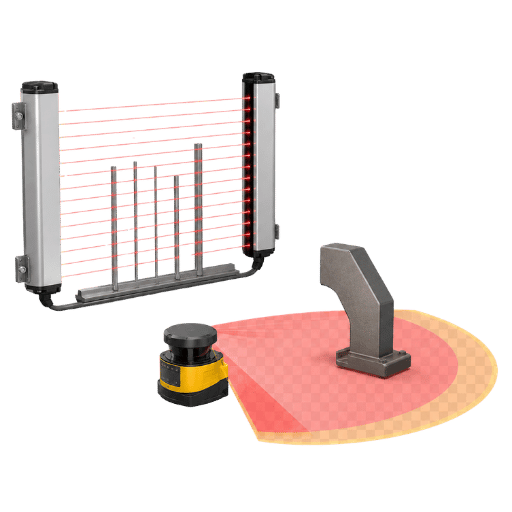
La resolución divide la aplicabilidad del dispositivo por partes del cuerpo. Es la mejor característica de separación entre las tecnologías. Con haces de 14 mm, una cortina de luz Tipo 4 detendrá un dedo, 30 mm por mano, 40 mm por cuerpo. La altura de visualización abarca desde sólo 160 mm (en unidades pequeñas) hasta un metro o más (p. ej., 1800 mm+ para el control de todo el cuerpo). Debido a que se activa tan pronto como se bloquea incluso un haz, es factible acercarse al peligro manteniendo los tamaños de apertura protegidos al mínimo.
Por el contrario, un escáner láser prioriza el alcance por encima de la resolución. El objeto más pequeño que un escáner normalmente puede detectar está en el rango de 70 mm (protección de las piernas para la zona del piso), pero extiende la detección a varios metros (por ejemplo, un campo de peligro de 5,5 metros y un campo de advertencia de 20 metros). Un escáner no notará un dedo, pero puede observar una zona completa alrededor de un autómata, alterar su forma de zona protectora a medida que el dispositivo cambia de tarea e ignorar intrusiones de fondo persistentes como la trayectoria de una carretilla elevadora. Para monitorear una zona de peligro vasta e irregular para cuerpos enteros (o incluso equipos de trabajadores), esta cobertura de área es un beneficio que las cortinas no pueden ofrecer.
Especificar mal la resolución de los dedos de 14 mm frente a la de 30 mm es un error común y costoso, porque el espaciado incorrecto del haz no protege los dedos en el punto de operación o se dispara con un antebrazo en producción. QJKH mantiene la resolución de los dedos en una tolerancia de 14 mm exactamente por esta razón, de acuerdo con la norma ISO 13855.
La relación resolución-distancia de seguridad para ambos dispositivos se define en ISO 13855.
Comparación de especificaciones cara a cara
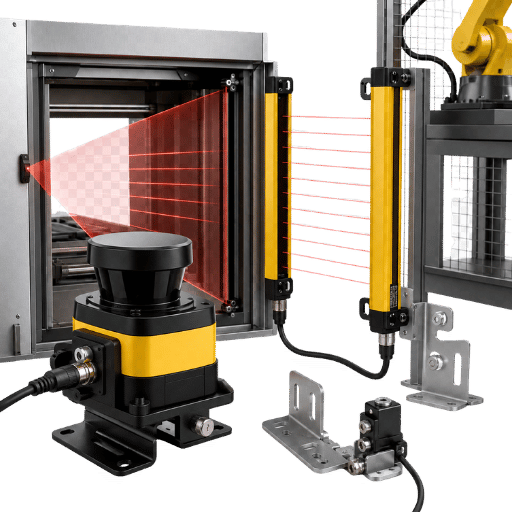
Aquí está la tabla completa de especificaciones de escáner contra cortina de 12 filas, una al lado de la otra. Úselo para preseleccionar antes de leer la sección de la aplicación.
| Característica | Cortina de luz de seguridad | Escáner láser de seguridad |
|---|---|---|
| Método de detección | Rayo pasante infrarrojo (transmisor y receptor) | Láser difuso de tiempo de vuelo (luz reflejada) |
| Forma protegida | Plano 2D (cortina) | Área / campo 2D (configurable) |
| Resolución | 14 / 30 / 40 mm | Objeto mínimo de ~70 mm |
| Rango/altura | 160-1.827 mm de altura del campo | ~5,5 m seguridad, 20 m advertencia |
| Campo de visión | Plano fijo | Hasta 270° |
| Velocidad de respuesta | ≤ 5-15 ms (respuesta rápida) | 60-134 ms (dependiente del ciclo de escaneo) |
| Zonas configurables | No (plano fijo) | Sí (conjuntos de múltiples zonas) |
| Silenciar/borrar | Sí (silenciar, borrar flotante) | En su lugar, cambio de zona |
| Montaje típico | Dos unidades, alineadas a cada lado | Unidad única, esquina o vehículo |
| Tolerancia ambiental | Tolera el polvo, el vapor y el lavado higiénico | Sensible al polvo, superficies reflectantes |
| Salida | OSSD al relé de seguridad o PLC | OSSD/Ethernet al controlador de seguridad |
| Peligro de mejor ajuste | Punto de operación, vigilancia de acceso | Zonas de área, suelo y robots móviles |
Las cifras se cotejan entre las especificaciones publicadas por SICK, Keyence (SZ-V), Datasensing y QJKH. Confirme siempre con la hoja de datos exacta del modelo.
Lea la tabla como un conjunto de compensaciones, no como un ganador: la resolución de 14 mm de la cortina es la razón por la que gana la prensa, mientras que el campo de 270° del escáner es la razón por la que gana la celda. Debido a que QJKH construye y certifica ambos, la comparación es honesta en lugar de una presentación de un solo producto, y cada número se verifica en hojas de datos CE e IEC 61496.
El método de detección del tiempo de vuelo del escáner está documentado en una patente estadounidense US9423499B2.
¿cuál se adapta a su aplicación?
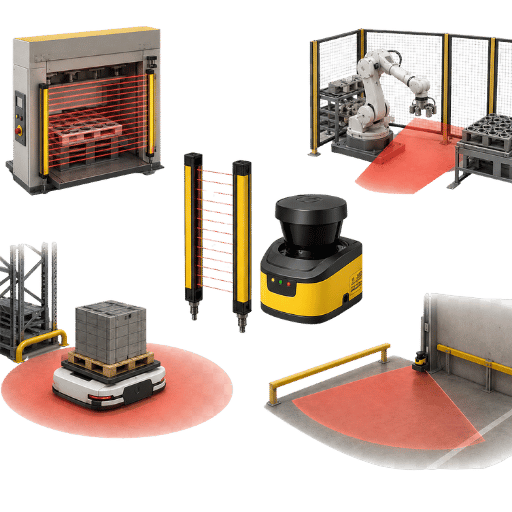
La elección depende de dónde está el peligro y si algo se mueve. El siguiente mapa de escenario a dispositivo cubre los casos más comunes en maquinaria, robótica y automatización. Como regla de trabajo, los puntos de acceso fijos y los peligros en el punto de operación requieren una cortina de luz, mientras que los pisos abiertos, los perímetros de las células robóticas y las plataformas móviles hacen que el escáner láser sea la mejor opción; En muchas líneas ambos sensores de seguridad funcionan juntos.
| Escenario | Dispositivo recomendado | Por qué |
|---|---|---|
| Prensa eléctrica/prensa hidráulica punto de operación | Cortina ligera tipo 4 | Detección de dedos + respuesta rápida en el punto de mordisco |
| Acceso a celda robótica/piso perimetral | Escáner láser | Guarda el área alrededor del robot; cambio de zona |
| Plataforma móvil AGV/AMR | Escáner láser | Se mueve con el vehículo; requerido por la norma EN ISO 3691-4 |
| Transportador/paso de palés | Cortina de luz silenciadora | Dejemos pasar el producto mientras protegemos a los operadores |
| Zona peligrosa grande o irregular | Escáner láser (a menudo con cortina en el acceso) | Las zonas de software cubren formas que un avión no puede |
Tienda de prensa. En una línea de estampado, un operador alimenta manualmente los espacios en blanco a una prensa hidráulica cada pocos segundos. Aquí, una cortina Tipo 4 de 14 mm montada en la estación del operador detecta la entrada de los dedos y detiene el ariete en milisegundos, mientras que el silenciamiento permite que la pieza terminada salga por la salida sin una parada falsa. Un escáner no puede ver el dedo y su respuesta de 60-134 ms forzaría el plano de la cortina a retroceder mucho «la cortina es la única opción correcta para proteger a los trabajadores en este punto de operación.
Celda de soldadura robótica. Una celda de soldadura robótica lanza chispas y se mueve de manera impredecible, por lo que el peligro es toda el área del piso, no una sola abertura. Un escáner láser montado en una esquina observa la zona de aproximación, ralentiza el robot cuando alguien ingresa a la zona de advertencia y lo detiene en la zona protegida ñan luego se reanuda automáticamente una vez que el área se despeja, evitando un reinicio manual. Una cortina en la entrada de la celda puede complementarlo para proteger el acceso.Protección de células robóticas generalmente capas ambas.
Pasillo AGV. En un almacén automatizado, un AGV recorre pasillos compartidos por donde camina la gente. Un escáner montado en la parte delantera del vehículo escanea el plano de tierra que se encuentra delante, reduciendo la velocidad en el campo exterior y deteniéndose antes del contacto en el campo interior cuando los objetos entran en su camino. Este es el trabajo de libro de texto para un escáner y una cortina fija simplemente no puede circular 'veo seguridad AGV para orientación sobre diseño.
¿Dónde se suelen utilizar los escáneres láser de seguridad?
Los escáneres láser de seguridad se utilizan dondequiera que la zona protegida sea un área en lugar de una línea: alrededor de células robóticas, en AGV y robots móviles autónomos, en el perímetro de almacenes automatizados y en máquinas grandes donde una persona puede permanecer dentro del área peligrosa. Sus zonas configurables y su alcance de varios metros los convierten en los predeterminados para la robótica móvil y la protección de áreas, razón por la cual EN 1525 se apoya en ellos para camiones industriales sin conductor.
El error común aquí es forzar un dispositivo a enfrentar cada peligro, porque un plano de cortina fijo no puede montar un AGV y un escáner de 70 mm no puede proteger una presión de prensa. En la práctica, en una prensa hidráulica o en una celda de robot, hacer coincidir el dispositivo con el riesgo “no con el hábito “es la diferencia entre una auditoría limpia y un operador expuesto, razón por la cual los ingenieros de aplicaciones QJKH comienzan con EN ISO 3691-4 y la evaluación de riesgos.
Cálculo de la distancia mínima de seguridad (ISO 13855)
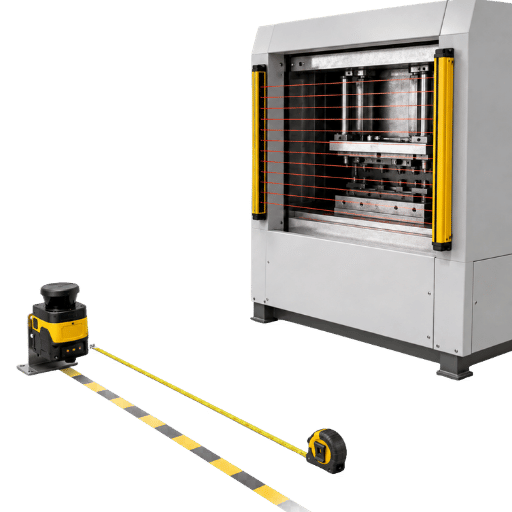
Ambos dispositivos comparten una fórmula para la distancia segura, y ejecutarlo usted mismo es la forma más rápida de sentir la diferencia entre ellos. ISO 13855 proporciona la distancia mínima al peligro como:
S = K × T + C
S = K•T+C donde S es la distancia mínima de seguridad (mm), K es la velocidad de aproximación (2000 mm/s para movimiento de mano/brazo hasta 500 mm), T es el tiempo total de parada de todo el sistema de seguridad, y C es la distancia de intrusión que depende de la capacidad de detección.
Cortina de luz, trabajada. Para una cortina de 14 mm con resolución de dedos, el término de intrusión es C = 8 • (d 14) = 8 • (14 « 14) = 0 mm. Si el tiempo total de parada de la cortina más la máquina T es 0,2 s, entonces S = 2000 • 0,2 + 0 = 400 mm. Cambie a una cortina de resolución manual de 30 mm y C = 8 • (30 « 14) = 128 mm, por lo que S = 400 + 128 = 528 mm. Una resolución más fina le permite montarse más cerca y ahorrar espacio en el suelo.
Escáner láser, funcionó. Para una zona de piso horizontal, el estándar generalmente usa un algoritmo de caminata y agrega un término de altura: S = (1600 T) + 1200 0,4 H, y luego permite una incertidumbre de medición Z para el escáner. Para T = 0,2s y H = 300 mm de altura de montaje, S = 320 + 1200*120 = 1400 mm, y agregar los aproximadamente 100 mm de incertidumbre de medición lo lleva a 1500 mm. La velocidad más lenta y el término de intrusión más grande son los que impulsan un enfrentamiento mucho mayor para un escáner en comparación con una cortina fina alrededor de una celda, terrible al presionar.
📐 Nota de ingeniería
T debe ser toda la cadena: tiempo de respuesta del dispositivo + PLC o tiempo del relé de seguridad + tiempo de parada de la máquina. Ese tiempo de la máquina debe ser una medición documentada, no una estimación, de una prueba de tiempo de parada estándar de la máquina. Realice un nuevo cálculo cada vez que se cambie el controlador o el elemento final. Según el cálculo ISO 13855, K = 2000 mm/s para alcances cortos (500 mm o menos), los rangos más largos utilizan la información de las extremidades.
Omitir este cálculo es uno de los errores más costosos en la protección de la máquina, porque montar dentro de la distancia segura deja el peligro expuesto incluso cuando el dispositivo lee OK y pasa una verificación rápida. El resultado de la cortina de 400 mm y el resultado del escáner de aproximadamente 1500 mm anterior no son intercambiables; QJKH ejecuta los números ISO 13855 en comparación con el tiempo de parada medido antes de citar una posición de montaje.
Estos cálculos de velocidad de aproximación se rigen por ISO 13855, con deberes en el punto de operación establecidos por OSHA 29 CFR 1910.217.
Costo total de propiedad durante 5 años
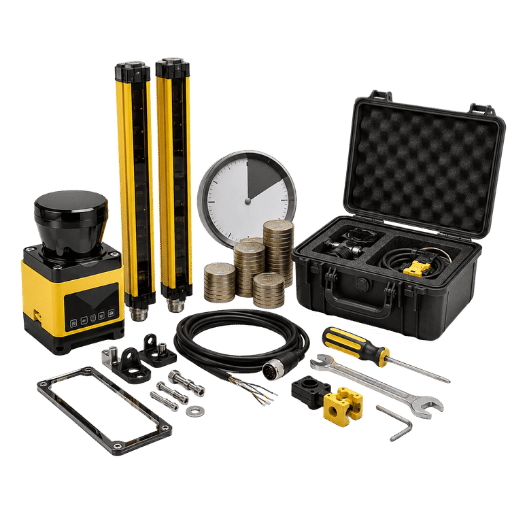
El precio de la pegatina no es el gran número. Generalmente desglosamos los costos reales en esta pila de costo de propiedad de 5 capas:
La pila de costo de propiedad de 5 capas
- Dispositivopar de cortinas frente a escáner único.
- ControlWiring -sond OSSD conectado a un relé de seguridad o a un PLC de seguridad (Allen Bradley, Siemens, equivalente).
- Instalación y alineación «alineación de dos cortinas de cabezal frente a un escáner y programación de zona.
- Tiempo de inactividad y viajes falsos - Los viajes del escáner se deben al polvo o el brillo frente a la vibración de la cortina después del reensamblaje.
- Reconfiguración y actualizaciones de software de flexibilidad versus ajustes mecánicos en líneas que se reutilizan con frecuencia.
Como generalización, hay un bajo costo del dispositivo y una baja configuración del sistema para la cortina de luz, tiende a ser simple de mantener, y esa es la razón por la que la cortina suele ser el costo más bajo de adquirir e implementar para la protección de punto de operación fijo. y para aplicaciones sensibles a los costos. Por otro lado, el escáner láser tiende a tener el costo inicial más alto y el tiempo de integración más largo, pero vale la pena rápidamente cuando los tiempos de reequipamiento y los tiempos de cambio de producción son altos. Estas posiciones no son cifras firmes: consulte una cotización que incluya la configuración de la máquina, el ciclo de trabajo, etc., para que podamos discutir las listas de precios de los dispositivos que se mueven.
El costo oculto es el tiempo de inactividad: un escáner que realiza viajes molestos en una plataforma reflectante puede perder más en producción que los costos del dispositivo, porque las paradas falsas se componen a lo largo de una vida útil de 5 años y un conjunto de zonas sintonizadas puede reducirlas drásticamente. Debido a que QJKH construye ambos, nuestros ingenieros ajustan las zonas y el límite de detección de 70 mm a la línea en lugar de vender en exceso la opción más cara.
La obligación de protección subyacente que impulsa estos costos del ciclo de vida se remonta a Normas de protección de máquinas OSHA.
Limitaciones, modos de falla y errores de campo comunes
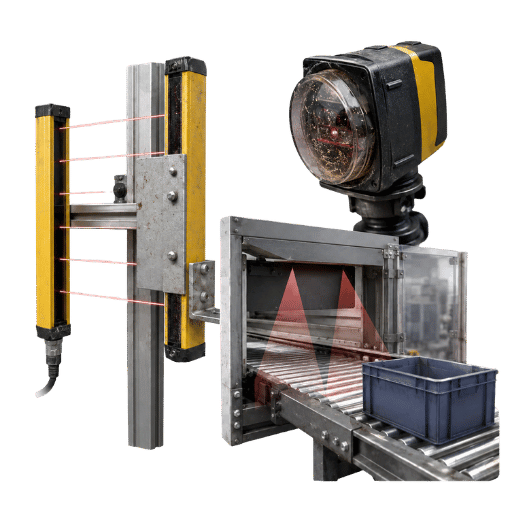
✔ Cortina de luz « fortalezas y límites
- Resolución a nivel de los dedos y respuesta rápida
- Autocontrol, tolerante al polvo y lavado higiénico
- Límite: solo un plano fijo, sin cobertura de área
- Límite: derrotado por alcance o alcance si está mal montado
⚠ Escáner láser « fortalezas y límites
- Cobertura de área configurable y cambio de zona
- Ideal para AGV, robótica y zonas irregulares
- Límite: resolución de ~70 mm, sin detección de dedos
- Límite: el rendimiento óptico se degrada con polvo, vapor, superficies reflectantes y absorbentes
Tendemos a observar estos 6 errores desde el campo, siempre que un equipo debe decidir entre estos sistemas:
- «Un rayo de dedo en una prensa, un escáner estándar tipo 3, no puede satisfacer el punto de funcionamiento: esa es la regla del techo tipográfico.
- -Alcance sobre o circunvalación redonda. Este es un plano vertical por el que debe pasar un operador. Han logrado una colocación correcta. Pero un humano puede simplemente pasar por encima o alrededor del plano de seguridad.
- -- Colocado demasiado cerca. Simplemente no ejecutar la norma ISO 13855 (arriba) significa que el operador entra en la zona de seguridad.
- --evitar el silenciamiento. Silenciar requiere distinción entre producto y personas. Derrotarlo es como abrir la puerta y dejarlo desatendido.
- -no incluyas toda la pila de parada. Necesitamos mirar más allá de la simple respuesta del dispositivo y también del PLC y el tiempo final de parada de la máquina en “T”
- -pisos Brillantes que causan paradas “molestas” para los escáneres láser. Los pisos brillantes o húmedos y las paletas pueden reflejar el haz creando disparos que son solo la causa de inconvenientes, más que de seguridad en algunas ocasiones.
En la práctica, en una línea de prensa de fundición o en una celda de carpintería, el polvo, el vapor y las superficies reflectantes son el verdadero límite en un escáner, mientras que el plano de 14 mm de una cortina se anula al alcanzarla si se monta sin una verificación de superficie permanente. QJKH valida estos modos de falla internamente antes del envío, porque un error perdido aquí es una lesión perdida.
El autocontrol de la ventana óptica del escáner contra el modo de falla de polvo y contaminación está cubierto por una patente estadounidense US11624823B2.
Cómo elegir: el selector de 4 preguntas
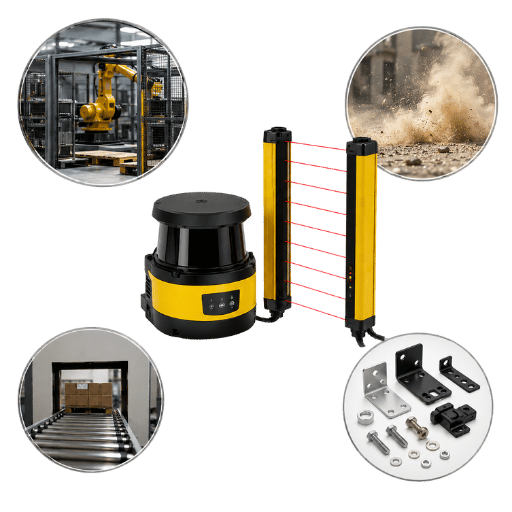
Cuando una situación urgente requiera una decisión rápida, ejecute el escáner de 4 preguntas o el selector de cortina. Resuelve la mayoría de los casos en menos de un minuto, enrutando los riesgos del punto de operación con los dedos y las manos a una cortina de luz, los peligros del área y del piso a un escáner láser, las plataformas móviles a un escáner y las necesidades combinadas de perímetro más acceso a un sistema en capas.
- ¿Existe algún punto de operación con detección de presencia de dedos o manos en un punto fijo? Cortina de luz.
- ¿El área a proteger es plana o es un área/piso o área irregular? Escáner láser.
- ¿el guardia de seguridad es móvil, por ejemplo, en un AGV/AMR? Escáner láser.
- ¿Es necesario proteger tanto el perímetro/área como el punto de operación? Capa ellos.
Las capas tienen sentido. El escaneo de área a menudo proporciona cobertura de zona periférica alrededor de las celdas de un robot y luego una cortina de luz proporciona cobertura plana a través de una entrada. Ambos están conectados a relés de seguridad. Si las alfombras de seguridad sensibles a la presión son una opción, puede consultar nuestra comparación tripartita de cortinas de luz, escáneres láser y tapetes de seguridad. Nuestro Guía de selección tipo 2 vs tipo 4 le ayuda a elegir el tipo de cortina adecuado al nivel de seguridad.
En la práctica, en una plegadora o en un pasillo AGV, la respuesta incorrecta aquí es el error más costoso porque está bloqueado en el momento de la instalación y un escáner de 70 mm no se puede adaptar a un dispositivo de 14 mm. Confirme la llamada con su evaluación de riesgos y EN ISO 3691-4 para plataformas móviles; Los ingenieros de QJKH comprobarán la cordura del diseño antes de comprometerse.
Perspectivas de la industria: por qué las líneas se están desdibujando
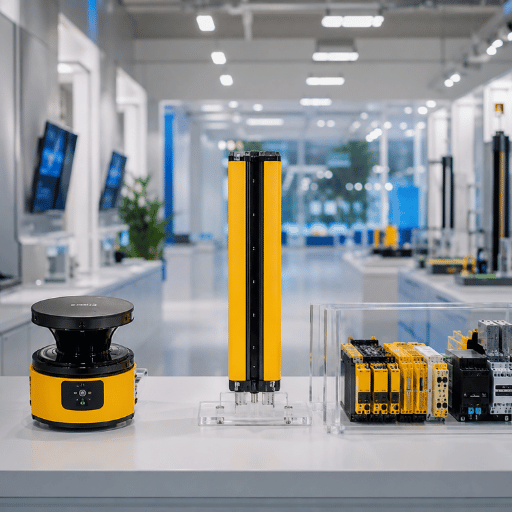
Es exagerado decir que hoy es “escáner versus cortina”. Es más bien que coloques tus cortinas de luz y escáneres para cubrir tanto los peligros del punto de operación fijo como del área móvil. Los robots AGV, AMR y Collaborative ciertamente están impulsando la evolución y con ellos aumentan la necesidad de detección de áreas ágiles, ya que un plano de luz estático no se adapta a la movilidad, como verá ilustrado por las actualizaciones de estándares ISO 3691-4 publicadas en 2023 que cubren vehículos industriales sin conductor. camiones y una actualización de la especificación IEC 61496-3 que endurece los requisitos de cobertura en 2025. No lo olvides, la protección de los dedos en un punto de operación no está cambiando, ese sigue siendo firmemente el trabajo de las cortinas de luz (específicamente Tipo 4/SIL 3). Entonces, la pregunta importante que debe hacerle a su proveedor de seguridad no es “¿o?” es “¿cómo se emparejan mejor en mi aplicación?” El sistema de seguridad que está instalando para integrar estos dispositivos debería poder soportar fácilmente cada uno. Por ejemplo, los analistas predicen que el mercado de escáneres láser de seguridad crecerá hasta $0.5 mil millones en 2025 y más allá, así que mantenga esta tecnología de seguridad a la vista, pero no debería ser su factor decisivo.
💡 Consejo profesional
Asegúrese de que el controlador de cortina de luz elegido esté preparado para dos entradas de dispositivos de seguridad, de modo que pueda expandirse en cualquier momento; será significativamente más económico en instalación y programación agregar monitoreo de área con su escáner láser de seguridad en el futuro.
La revisión de 2023 de ISO 3691-4 codifica el uso de escáneres de seguridad en vehículos industriales sin conductor.
Preguntas frecuentes
P: ¿Cuál es la diferencia entre una cortina de luz de seguridad y un escáner láser de seguridad?
Ver respuesta
Una cortina de luz de seguridad utiliza rayos infrarrojos para detectar un objeto opaco que rompe un plano, alcanzando el Tipo 4/ SIL 3 con una resolución de dedo de 14 mm y una respuesta inferior a 15 ms. Un escáner láser de seguridad utiliza un láser de tiempo de vuelo para monitorear un área de hasta 270 grados, alcanzando el Tipo 3/ SIL 2 con una resolución de ~70 mm y una respuesta de 60-134 ms. La cortina protege un punto de operación; el escáner protege un área o piso.
P: ¿Puede un escáner láser de seguridad reemplazar una cortina de luz en una prensa eléctrica?
Ver respuesta
No. Un punto de operación de prensa eléctrica necesita detección de dedos y una respuesta muy rápida, que solo ofrece una cortina de luz Tipo 4/ SIL 3. Un escáner láser es Tipo 3/ SIL 2 con una resolución de aproximadamente 70 mm y una respuesta de 60-134 ms, por lo que no puede proteger el punto de contacto por sí solo. El escáner aún puede proteger el área alrededor de la prensa.
P: ¿Cuáles son las desventajas de los escáneres láser de seguridad?
Ver respuesta
Los escáneres láser de seguridad tienen una resolución más baja que las cortinas de luz (alrededor de 70 mm frente a 14 mm), por lo que no pueden proteger los dedos. Su respuesta es más lenta (60-134 ms), lo que obliga a una mayor distancia de seguridad. Como dispositivos ópticos de tiempo de vuelo, son sensibles al polvo, el vapor, la luz ambiental y las superficies reflectantes o absorbentes, lo que puede provocar paradas molestas en fundiciones y talleres de carpintería. También cuestan más y necesitan programación de zonas de software para configurar y validar en la línea.
P: ¿Qué es una cortina de luz láser?
Ver respuesta
Ese es un término vago: una cortina de luz emplea una serie de rayos LED IR invisibles, no un láser. El escáner se basa en el láser, mientras que la cortina no. Busque la clasificación de tipo ESPE en la hoja de especificaciones.
P: ¿Cómo se calcula la distancia de montaje segura para estos dispositivos?
Ver respuesta
Utilice la fórmula ISO 13855 S = K x T + C, donde K es la velocidad de aproximación (2000 mm/s para movimiento de la mano hasta 500 mm), T es el tiempo total de parada medido y C es la distancia de intrusión establecida por resolución. Para una cortina de 14 mm con T = 0,2 s, S es 400 mm. Las zonas de escáner horizontal añaden un término de altura y una tolerancia de medición, por lo que necesitan más de un metro de separación.
P: ¿Se pueden utilizar una cortina de luz y un escáner láser juntos?
Ver respuesta
Sí, comúnmente. Un escáner protege el piso alrededor de una celda de robot mientras que una cortina de luz protege la entrada de la celda, con ambas salidas OSSD conectadas a un relé de seguridad o PLC de seguridad. Este enfoque en capas brinda cobertura de área y protección en el punto de operación.
Acerca de este análisis
QJKH diseña y fabrica cortinas de luz de seguridad (Serie ENT, Tipo 4 SIL 3) y escáneres láser de seguridad (Serie SH, Tipo 3 SIL 2) en nuestras instalaciones de Hangzhou, por lo que esta comparación entre escáner láser de seguridad y cortinas de luz se basa en especificaciones reales para ambos. tecnologías en lugar de una sola línea de productos. Las cifras de los dispositivos se compararon con los datos publicados de SICK, Keyence y Datasensing y los estándares IEC 61496 e ISO 13855. Revisado por el equipo técnico de QJKH.
Referencias y fuentes
- 29 CFR 1910.217, Prensas eléctricas mecánicasAdministración de Seguridad y Salud en el Trabajo
- eTool: Protección de máquinas, dispositivos de detección de presenciaOSHA
- ISO 13855, Posicionamiento de salvaguardas (velocidades de aproximación)Organización Internacional de Normalización
- ISO 3691-4, Carretillas industriales sin conductorISO
- EN IEC 61496-3:2025, Equipos de protección electrosensibles (AOPDDR)IEC
- Estudios de caso de robots y automatización como intervenciones de salud/seguridadNCBI/PMC
- US11624823B2, Escáner láser de seguridad que mantiene la operatividadUSPTO